
Dukabet Kenya app — mobile betting and casino
The Dukabet Kenya app gives you full access to the sportsbook, crash games, slots, and live dealer tables from your Android or iOS phone. Place KPL bets, top up via M-Pesa STK push, and withdraw winnings without ever opening a browser tab. The app is not distributed through Google Play — you download it directly from the Dukabet site, which is standard for BCLB-licensed betting operators in Kenya. Most players in Nairobi, Mombasa, and Kisumu go this route without any issues.


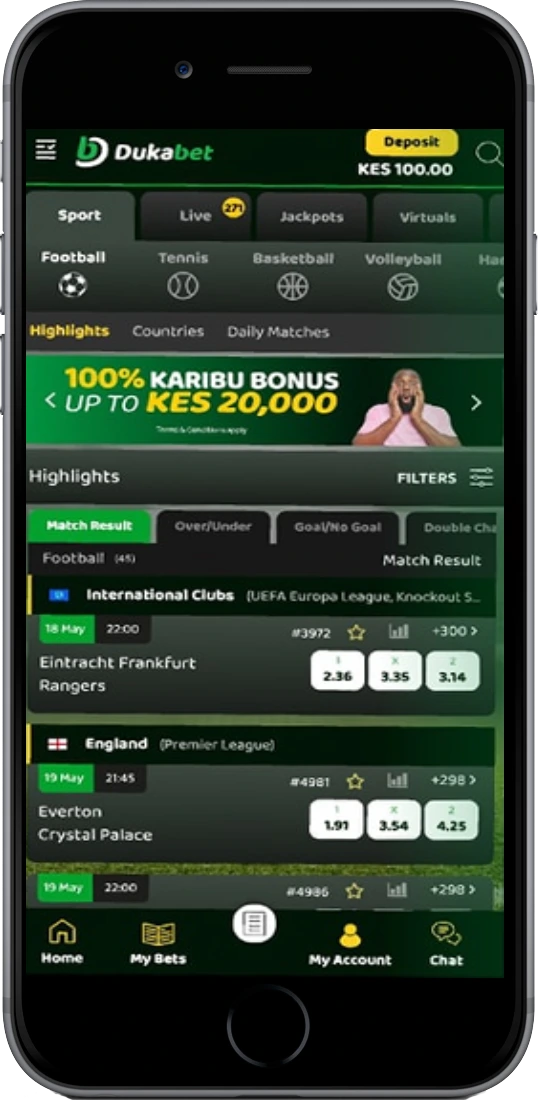
What the Dukabet app gives you
The app is a full mobile casino and sportsbook — not a stripped-down version of the desktop site. Every feature available on the browser is here, plus a few that aren't. Below are the main things you get access to once it's installed.
Live sports betting
In-play betting on football, rugby, basketball, and athletics with odds updating every few seconds. Cashout works on live markets, and you can follow multiple matches at once using split-screen bet slips.
Crash games including Aviator
Aviator by Spribe (RTP 97%), JetX by SmartSoft Gaming, Lucky Jet, and Spaceman all run natively. Auto-cashout and dual-bet mode work cleanly on mobile screen sizes without lag.
Slots and jackpots
Over 200 slot machines from Pragmatic Play, NetEnt, Play'n GO, and others. Progressive jackpot slots are part of the catalogue — Wolf Gold has paid above KES 2 million on mobile sessions to Kenyan players.
Live dealer casino
Evolution Gaming tables: Lightning Roulette (RTP 97.3%), Infinite Blackjack (RTP 99.5%), Speed Blackjack, and Immersive Roulette. HD streams hold up well on Safaricom 4G in Nairobi and Mombasa city centres without buffering.
M-Pesa deposits and withdrawals
STK push deposit fires directly from the app — you don't switch to the M-Pesa USSD menu manually. Minimum deposit is KES 50. Withdrawals to M-Pesa from the cashier process in 1–4 hours; Wednesday afternoons typically run faster at around 1–2 hours.
Push notifications
Match start alerts, bet settlement updates, and bonus offer pings. You control which notifications are active under app settings — most Kenyan players keep match results and cashout alerts on while muting promotional ones.
Biometric login
Fingerprint and face ID login on Android 8+ and iOS 13+. It's noticeably faster than typing credentials when you're quickly checking live odds during a Gor Mahia or AFC Leopards match.
Bet history and statistics
Full betting history filtered by sport, date range, and bet type. Open bets and settled bets sit on separate tabs. Useful for reviewing accumulator performance over a full KPL season or tracking your Aviator session results.
How to download and install the Dukabet app on Android
The process takes about 2 minutes on a Safaricom 4G connection. The APK file is roughly 18 MB — small enough to download on mobile data without worrying about your bundle. iOS users follow the same steps through Safari on the Dukabet site and install via a profile prompt.
Go to Settings → Security → Install unknown apps and enable it for your browser. On Android 10 and above, this permission prompt appears automatically when you tap the downloaded APK — you don't need to dig through settings first.
Tap "Download for Android" on this page. Your browser starts downloading the Dukabet APK directly. The file appears in your notification bar as the download progresses.
Pull down the notification bar and tap the downloaded file, or find it in your Downloads folder via the Files app. Tap "Install" when the system prompt appears and wait about 10 seconds.
Open the app, sign in with your registered phone number and password, or create a new account in under 3 minutes. You can make a KES 50 M-Pesa deposit immediately after logging in.
Technical requirements and compatible devices
The app runs on most phones sold in Kenya in the last 4–5 years. Budget Android handsets — Tecno Spark, Infinix Hot, Samsung Galaxy A-series — all handle it without performance issues. The live casino streams need a stable 3G connection at minimum; 4G or Wi-Fi gives you noticeably smoother video for Lightning Roulette and Immersive Roulette tables. If you're on Airtel or Telkom Kenya's network in a smaller town, 3G coverage is usually enough for sports betting and slots, though crash games may occasionally stutter during peak hours.
| Requirement | Android | iOS |
|---|---|---|
| Minimum OS version | Android 6.0 | iOS 12.0 |
| Storage required | ~18 MB | ~22 MB |
| RAM recommended | 2 GB | 2 GB |
| Internet connection | 3G minimum | 3G minimum |
| Download source | Dukabet site (APK) | Dukabet site |
| Biometric login | Android 8+ | iOS 13+ |
App vs mobile browser — what's actually different?
The mobile browser version of Dukabet works fine for most things. But a few features are app-only. Push notifications for live odds changes and bet settlement are not available in the browser. Biometric login doesn't work in browser sessions either — you type your credentials every time. The app also loads faster on repeat visits because it caches the interface locally. On a Tecno Spark 10 with Safaricom 4G, the app opens to the homepage in about 1.8 seconds, compared to 3–4 seconds for a browser cold start.
The game catalogue is identical on both platforms. Payment methods, account management, KYC document upload, and responsible gaming tools all work the same way in both. If you're on an older phone with limited storage — say, 8 GB internal with most of it used — the browser is a reasonable alternative. The site is fully responsive down to 320px screen width and has been tested on Tecno Pop and Itel A-series handsets common in Kisumu and Nakuru markets.
| Feature | App | Mobile browser |
|---|---|---|
| Push notifications | ✓ | ✗ |
| Biometric login | ✓ | ✗ |
| Load speed (repeat visit) | ~1.8 sec | ~3–4 sec |
| Full game catalogue | ✓ | ✓ |
| M-Pesa STK push | ✓ | ✓ |
| Storage required | ~18 MB | 0 MB |